Bol.com
What are bol’s requirements for product photos?
 Lars HurkmansCo-founder27 October 2026Lesezeit 6 Minuten
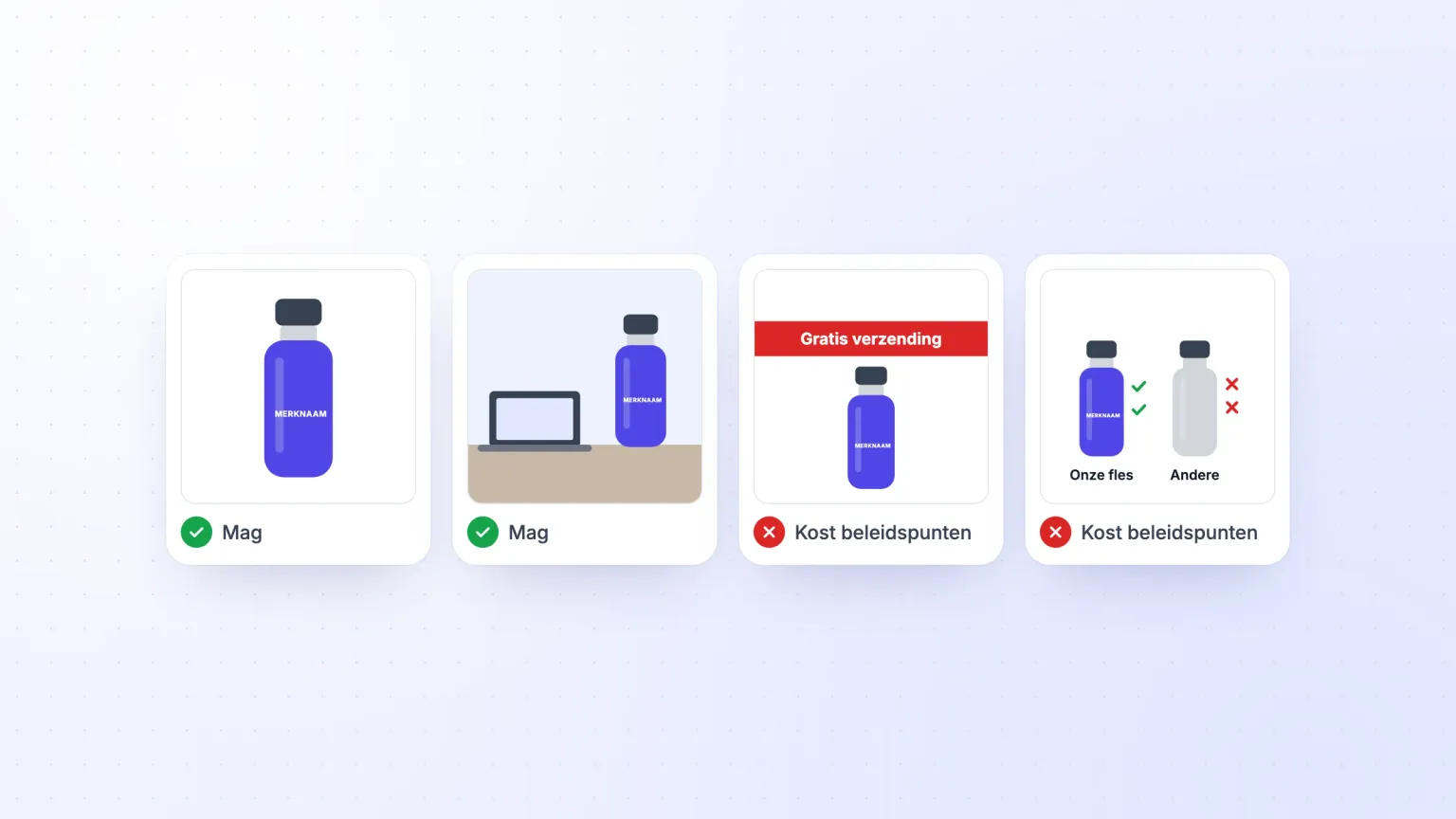
Put product photos with your item on bol, and they must not contain self-promotion. A review, a discount label, "free shipping" or your company logo on a photo costs you policy points. Since 1 July 2025, bol no longer checks the guidelines for your main photo, such as a white background. The dimensions are a hard requirement, though. You can’t upload a photo smaller than 500 by 500 pixels.
In diesem Artikel
What are the rules for product photos?
For photos, bol distinguishes between rules and guidelines. The rules apply to all your product information, so to both text and photos. If you break them, it costs you policy points. Bol stopped checking the image guidelines on 1 July 2025.
Say you sell a 750 ml stainless steel water bottle under your own brand and have eight photos made of it. Four of them are allowed, four cost policy points.
Which photos are allowed?
Photos 1 to 4 follow bol’s guidelines.

- Photo 1, the main photo. The front of the bottle, out of its packaging, on a white background without a shadow and without text. That is what bol recommends for the main photo.
- Photo 2, another angle. The bottle with the cap off. Bol recommends showing your item from different sides.
- Photo 3, a sketch with the dimensions. Bol also mentions this on its content page.
- Photo 4, a lifestyle photo. The bottle on a desk. You include lifestyle photos where they add something. Their background may be a colour other than white.
Every photo is at least 500 by 500 and at most 6000 by 6000 pixels, and between 30 kB and 10 MB. White space doesn’t count towards this. If a photo doesn’t meet these requirements, you get an error message when you upload it. From 1200 by 1200 pixels the customer can zoom in; on the content page bol recommends 1500 by 1500.
For the main photo, bol also lists these guidelines:
- only the item and the accessories that come with it, so what the customer receives
- the packaging may be included, as long as the item can also be seen on its own
- no models, text, statements, logos, icons or watermarks
- no lifestyle photo and no illustration, drawing, logo or icon instead of the item
- no front, side and back view together in one image
Bol no longer checks for these, but says they are meant to improve your visibility on bol and Google.
Which photos are not allowed?
Photos 5 to 8 cost policy points.

- Photo 5, "Gratis verzending" (free shipping). The word "free" and "free shipping" are not allowed in images.
- Photo 6, a review. Reviews are on the list of what is not allowed on images.
- Photo 7, a comparison. A comparison with other items is not allowed, not even without brand names. Bol calls that a misleading claim.
- Photo 8, a holiday. "Het perfecte cadeau voor Vaderdag" (the perfect gift for Father’s Day) is not allowed. You may not promote an item for a holiday, such as Father’s Day or Black Friday.
In its rules for images and product information, bol also prohibits:
- discount labels and discount offers, such as "1+1 free"
- promotional text such as "buy now" and "cheap", and sales slogans such as "while stocks last"
- service information, such as "extended warranty"
- claims about delivery or delivery time
- prices
- watermarks, company names and company logos
- a reference to your own webshop or another website
- stickers from Kieskeurig or the Consumentenbond (Dutch consumer association)
- generic or graphic images that are not a real product photo, except in the categories Hardware and Voertuigen en onderdelen (vehicles and parts)
Your brand may be on the product or the packaging. For a branded item, it must even be visible there. How to choose and register a brand name is explained in the blog on choosing a brand name and the blog on trademark registration with the BOIP.
If you put a new photo online, track your position
In the Ranking Tracker you track your position per keyword and in your main and subcategories, before and after the new photo.
What does a wrong photo cost?
For self-promotion, deception and using someone else’s photos, bol deducts up to 50 policy points. The exact number depends on how serious the violation is, the size of your range and the number of orders in the past 365 days.
You get the points back after a year. You can see your balance in your seller account, on the Prestaties (performance) page. If it drops to 0, bol closes your seller account permanently, together with the other seller accounts under the same Chamber of Commerce (KVK) number. What else leads to a closure is explained in the blog on a closed bol store.
What else does bol look at?
Bol also looks at where your photo comes from and whether it matches the item:
- Photos from someone else. You may not copy photos from other sellers on bol, and not images from Google either. According to bol, those are rarely free of rights. With (written) permission from the maker, for example the manufacturer, it is allowed.
- A photo that does not match. You may not ship an item that does not match the product images. A photo with a human model is not allowed if it adds nothing to the item.
Making your item more attractive with better photos is allowed. Bol does not count that as self-promotion. How to sell more with your photos is explained in the blog on findability and conversion.
How do you put your photos online?
You put photos online in your seller account, under "Mijn artikelen" (my items), and choose a view for each photo. You can choose the same view for several photos. Bol then puts the photos in order itself, based on quality and customer data.
Bol also does a few things with your photos:
- white space is cropped automatically
- the quality is adjusted so pages load fast, which can change the colour and sharpness
- an exact copy of a photo that is already there is not loaded
- a change is visible within 8 hours
Another seller can take one of your photos offline. You then find that photo under "Jouw offline afbeeldingen" (your offline images), where you can put it back online.
How to improve the rest of your listing is explained in the blog on optimising your product listing.
Summary: what is allowed on your photos?
- Photos of the item itself fit within bol’s guidelines. Think of the front on white, another angle, a sketch with the dimensions and a lifestyle photo.
- Advertising, a holiday or a comparison on a photo costs policy points. "Free shipping", a review, a price, a discount label or a watermark is not allowed on your photos either.
- A violation costs up to 50 policy points. If your points total reaches 0, bol closes your account for good.
- Bol no longer checks the guidelines for your main photo. The front on a white background is now only a guideline for your visibility.
- A photo must be at least 500 by 500 pixels. You can’t upload a smaller photo.
- Bol decides the order of your photos itself. You choose a view for each photo, and bol puts them in order based on quality and customer data.
Let the AI Listing Builder write your listing, free during your trial
14 Tage unverbindlich, ohne Zahlungsdaten.